
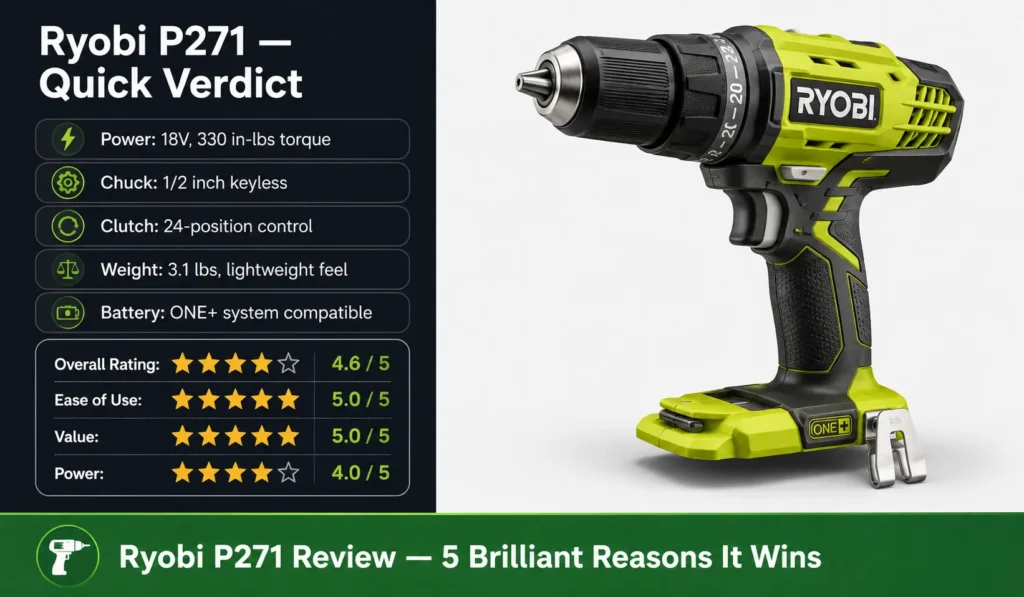
Looking for an honest Ryobi P271 review before you spend your money? I’ve been using this 18V drill driver for years — through bathroom renovations, furniture builds, deck repairs, and everything in between — and I can tell you right now: it earns its reputation. The P271 is not flashy, not the most powerful on the shelf, and it won’t impress a seasoned contractor. But for homeowners, DIYers, and anyone already in the Ryobi ONE+ family, it is one of the smartest buys in the cordless drill category. Stick with me and I’ll break down exactly what this drill does well, where it falls short, and whether it belongs in your toolkit.
What I Like
- Outstanding Value for the Price: The first thing that hit me when I got the Ryobi P271 was just how much drill you get for the money. As a bare tool, it comes in well under $50 at most US retailers, including Home Depot where it’s sold regularly. That’s an almost unbeatable price for a 1/2-inch chuck drill with a 24-position clutch, a 2-speed gearbox, and 330 inch-pounds of torque. I’ve bought more expensive drills that did less. For anyone building out their first home tool kit or replacing an old drill without wanting to spend big, this is where I’d start every conversation.
- The 24-Position Clutch Gives Real Control: I can’t say enough about how useful the clutch is on this drill. You turn the collar to one of 24 settings and the drill stops driving the moment the torque hits your preset limit. When I’m assembling flat-pack furniture — a weekly task in any American home — I set a low torque and drive screws into particle board without stripping a single one. When I’m drilling pilot holes in hardwood, I bump it up. This range of control is usually found on drills twice the price, and having it at this price point is genuinely special.
- Keyless Chuck Makes Bit Changes Fast: Changing bits used to be a two-hand job. The P271’s 1/2-inch keyless chuck lets me swap bits with one hand, in seconds. I don’t set the drill down, I don’t fumble for a chuck key, and I don’t lose momentum when a project calls for switching between a drill bit and a Phillips driver. That single-hand operation sounds minor, but on a day when you’re driving 200 screws into decking boards, it saves real time and real frustration.
- Magnetic Bit Tray Is More Useful Than It Sounds: There’s a small magnetic storage tray built into the base of the grip. I keep a couple of bits and a handful of screws stuck to it while I work. Before I had this feature, I was constantly setting bits on the workbench or holding them in my mouth — neither is ideal. Now my most-used bit is always within reach. It’s a small design choice that shows Ryobi was thinking about real workflow, not just specs on a box.
- ONE+ Battery Compatibility Is a Genuine Advantage: The Ryobi ONE+ 18V system is one of the largest cordless battery platforms in the world, and the P271 plugs straight into it. I already owned batteries for my Ryobi circular saw and leaf blower. Picking up the P271 as a bare tool meant I paid only for the drill, not for a new battery system. In the US market where Ryobi ONE+ tools are available at virtually every Home Depot, this interoperability is one of the strongest practical advantages this drill offers.
- The Rubber Grip Holds in Any Condition: Ryobi put a notched rubber pistol grip on the P271, and it works. I’ve used this drill with sweaty hands in summer, with greasy hands after working on a car, and with cold hands on a January deck repair. The grip held firm every time. It’s a subtle thing, but a drill that slips under stress is a safety hazard, and Ryobi addressed that correctly here.
- Top-Mounted Bubble Level for Accuracy: There’s a small spirit bubble level built into the top of the drill. When you’re drilling into a wall to hang a shelf or mirror, that level tells you instantly if you’re holding the drill straight. On a pistol-grip tool — which is naturally harder to hold perfectly level than a T-handle — this is a genuinely practical addition. It’s one of those features I didn’t think I needed until I used it, and now I notice when other drills don’t have it.
- 2-Speed Gearbox Covers a Wide Range of Jobs: The P271’s low gear tops out around 440 RPM with higher torque for heavy driving. The high gear runs up to 1,500 RPM for clean, fast drilling. Switching between them is a simple slider on the top of the tool. I use low gear for driving large lag screws and high gear for boring holes in softwood. Having both in one tool means I rarely need to reach for a second drill during a project.
What Could Be Better
- The Brushed Motor Is the Real Limitation: The P271 runs on an older brushed motor design, not a modern brushless one. In practical terms, a brushed motor generates more heat, wears down faster over time, and delivers less power per unit of battery energy than a brushless motor. For occasional home use this is fine — I’ve put mine through years of use without issue. But if you’re running this drill for hours a day or doing heavy work like driving large concrete anchors repeatedly, the motor will get warm and may eventually strain under that sustained load. Brushless drills in the Ryobi lineup are the step up when you need more.
- No LED Work Light: Nearly every competing drill at this price point — including the DeWalt DCD771 and Black+Decker 20V MAX — includes an LED light at the base of the chuck to illuminate the work area. The P271 does not have one. When you’re drilling inside a cabinet, in a dark corner, or under a staircase, you notice that missing light immediately. You end up holding a flashlight in your free hand or working blind. This is probably the most common complaint I hear from other P271 users, and it’s one Ryobi could fix with minimal cost to the design.
- Battery and Charger Are Not Included: The P271 is sold as a bare tool. If you don’t already own Ryobi ONE+ 18V batteries and a charger, you need to buy them separately. That adds $30–$60 to your total cost depending on the battery capacity you choose. Starter kits that bundle a battery and charger are available and do represent good value — but the sticker price on the bare tool doesn’t tell the whole story for a first-time buyer. Always factor in the battery cost before comparing prices with competing brands.
- Chuck Can Loosen Over Time: Some users — myself included, after extended heavy use — have noticed the chuck gradually loosening during long drilling sessions. This isn’t a manufacturing defect so much as a limitation of the design under sustained load. Tightening it back up before a session resolves the issue, but it’s worth knowing about. A brushless model with a higher-grade chuck won’t have this problem, but at this price point, it’s an acceptable trade-off.
- Feels Heavy for Extended Overhead Work: At 3.1 pounds, the P271 is not a lightweight drill. For single tasks — driving a shelf into a wall, assembling a bookcase — the weight is never an issue. But on a full day of overhead drilling, like installing ceiling fans or running cable through joists, the weight accumulates and your arm will know about it. If overhead drilling is a regular part of your work, a shorter, lighter brushless model might serve you better.
- No Fuel Gauge or Battery Indicator: There’s no on-drill indicator to show remaining battery level. You find out the battery is dead when the drill slows down and stops. Most Ryobi batteries have a charge indicator button on the pack itself, so it’s one extra step — but it would be more convenient if it were integrated into the drill.
My Personal Experience with the Ryobi P271
I want to be straight with you: I bought my first P271 with low expectations. At that price, I assumed I was getting a compromise tool that would frustrate me within a month. What happened instead was that I kept reaching for it over more expensive drills in my collection.
Here’s how real use actually looked for me over several months:
- Furniture assembly: Built two IKEA wardrobes and a full kitchen cabinet set. The 24-position clutch saved every single screw from stripping in the particle board. Not one blow-out.
- Bathroom renovation: Drove over 300 screws into cement board for a tile backer. The motor got warm toward the end of long sessions but never alarming. Finished the job over two days.
- Deck repair: Drove 3-inch deck screws into treated lumber on a 95°F summer day. Battery performance was consistent from first screw to last.
- Hanging shelves and mirrors: Used the bubble level constantly. Leveled 11 items across a room in one session. Zero crooked holes.
- Drilling into tile: Not recommended — and I learned that the hard way. This is a drill, not a hammer drill. It got through ceramic tile once with a proper bit, but it strained doing it. That’s a job for a hammer drill.
- Overhead work: Spent two hours drilling pilot holes for a ceiling fan installation. My arm was tired by the end. The weight is noticeable.
- The missing LED: Drilled three holes inside a dark closet and missed my mark on the first one because I couldn’t see the pencil mark clearly. Grabbed a headlamp after that.
- Battery life: With a 2.0Ah battery, I get roughly 30–45 minutes of active drilling before a recharge. A 4.0Ah battery nearly doubles that. I run a 4.0Ah now and rarely think about battery life.
- Chuck loosening: Noticed it once after a full afternoon of heavy driving. Tightened it, never had a problem since if I check it at the start of big sessions.
- Durability over time: My original P271 is still in regular use years after purchase. No broken parts, no motor failure. Ryobi’s build quality at this price point consistently impresses me.
Comparing With Other Brands
I’ve also used the DeWalt DCD771C2 and the Black+Decker LD120VA extensively — the DeWalt on a larger deck rebuild project and the Black+Decker when helping a friend set up their first home toolkit. Both are legitimate competitors to the Ryobi P271, and comparing them honestly shows exactly where each drill earns its place.
Ryobi P271 vs DeWalt DCD771: Quick Comparison
| Feature | Ryobi P271 | DeWalt DCD771C2 |
|---|---|---|
| Voltage | 18V | 20V MAX |
| Chuck Size | 1/2 inch keyless | 1/2 inch keyless |
| Motor Type | Brushed | Brushed |
| Max Torque | 330 in-lbs | 300 in-lbs |
| Max RPM | 1,500 RPM | 1,500 RPM |
| Clutch Positions | 24 | 15 |
| Speed Settings | 2-speed | 2-speed |
| LED Work Light | No | Yes |
| Bubble Level | Yes | No |
| Magnetic Bit Tray | Yes | No |
| Weight | 3.1 lbs | 3.57 lbs |
| Battery Compatibility | Ryobi ONE+ (18V) | DeWalt 20V MAX |
| Avg. Street Price (Tool Only) | ~$39–$49 | ~$59–$79 |
| Best For | ONE+ users, DIYers, value buyers | DeWalt ecosystem users, LED fans |
Bottom line: The Ryobi P271 wins on price, torque, clutch precision, and weight. The DeWalt DCD771 wins on the LED work light and brand ecosystem if you’re already invested in DeWalt 20V tools. For pure value and feature depth at this price, the P271 is the stronger pick.
Ryobi P271 vs Black+Decker LD120VA: Quick Comparison
| Feature | Ryobi P271 | Black+Decker LD120VA |
|---|---|---|
| Voltage | 18V | 20V MAX |
| Chuck Size | 1/2 inch keyless | 3/8 inch keyless |
| Motor Type | Brushed | Brushed |
| Max Torque | 330 in-lbs | 115 in-lbs |
| Max RPM | 1,500 RPM | 650 RPM |
| Clutch Positions | 24 | 11 |
| Speed Settings | 2-speed | 1-speed |
| LED Work Light | No | Yes |
| Bubble Level | Yes | No |
| Magnetic Bit Tray | Yes | No |
| Weight | 3.1 lbs | 2.6 lbs |
| Battery Compatibility | Ryobi ONE+ | Black+Decker 20V |
| Avg. Street Price (Tool Only / Kit) | ~$39–$49 | ~$49–$59 (kit w/ battery) |
| Best For | More power, precision, versatility | Ultra-light tasks, beginners |
Bottom line: The Ryobi P271 is significantly more powerful and more precise than the Black+Decker LD120VA. The B+D is lighter and often comes bundled with a battery, which helps entry-level buyers. But for anyone who plans to do real home projects — drilling into wood, driving larger screws, doing renovation work — the P271 is in a different league.
Ryobi P271 vs Milwaukee M18 2801-20: Quick Comparison
| Feature | Ryobi P271 | Milwaukee M18 2801-20 |
|---|---|---|
| Voltage | 18V | 18V |
| Chuck Size | 1/2 inch keyless | 1/2 inch keyless |
| Motor Type | Brushed | Brushless |
| Max Torque | 330 in-lbs | 500 in-lbs |
| Max RPM | 1,500 RPM | 1,700 RPM |
| Clutch Positions | 24 | 15 |
| Speed Settings | 2-speed | 2-speed |
| LED Work Light | No | Yes |
| Bubble Level | Yes | No |
| Magnetic Bit Tray | Yes | No |
| Weight | 3.1 lbs | 2.4 lbs |
| Battery Compatibility | Ryobi ONE+ | Milwaukee M18 |
| Avg. Street Price (Tool Only) | ~$39–$49 | ~$129–$149 |
| Best For | Budget DIYers, ONE+ users | Professionals, heavy users |
Bottom line: The Milwaukee M18 2801-20 is objectively a more capable drill — brushless motor, more torque, lighter weight, built for professional use. It also costs three times as much. If you’re a professional contractor or do heavy daily drilling, the Milwaukee earns its price. For a homeowner doing weekend projects, the P271 gives you 80% of the performance at 30% of the cost. That gap is where the Ryobi wins.
Recommendation
So who should get the Ryobi P271? After using it across dozens of home projects, I have a clear answer.
This drill is a great fit if you:
- Already own Ryobi ONE+ 18V batteries — the bare tool price makes this a near-instant buy
- Are a homeowner or active DIYer doing repairs, furniture assembly, shelf hanging, or light renovation work
- Want a full-featured drill with a 24-position clutch and 1/2-inch chuck at a genuine entry-level price
- Are building your first tool collection and want to join a wide battery ecosystem (Ryobi ONE+ has over 260 compatible tools)
- Live in the US and shop at Home Depot, where Ryobi tools and batteries are stocked year-round and easy to find
Do more research before buying if you:
- Are a professional contractor doing all-day drilling — a brushless model like the Ryobi PCL206B or Milwaukee M18 is better suited for that workload
- Drill frequently in dark or enclosed spaces — the missing LED will frustrate you, and you should look at the DeWalt DCD771 or Ryobi’s brushless models that include lighting
- Don’t own any Ryobi ONE+ batteries yet and are comparing total bundle prices — at that point the DeWalt or Milwaukee starter kits may offer comparable all-in cost
- Regularly work overhead for extended periods — the 3.1-pound weight adds up over hours, and a lighter brushless model will save your arm
My honest take: the Ryobi P271 review I wish I had read before buying was one that told me simply — this drill will handle 90% of what a homeowner needs, at a price that doesn’t sting, built on a battery platform that keeps giving you value with every new tool you add to the collection. That’s what this drill is. It’s not glamorous and it’s not the most powerful thing in the aisle. But it’s reliable, well-designed, and priced for real people doing real work at home. I’d buy it again without hesitation.
FAQs for Ryobi P271 Review
What is the Ryobi P271 used for?
The Ryobi P271 is an 18V cordless drill driver. It drills holes and drives screws. It works well for home repairs, furniture builds, and light renovation tasks.
Does the Ryobi P271 come with a battery?
No. The P271 is sold as a bare tool. It does not include a battery or charger. It fits any Ryobi ONE+ 18V battery, including lithium-ion and older NiCad packs.
How many clutch settings does the Ryobi P271 have?
The P271 has 24 clutch settings. These let you control how much torque the drill applies before it stops driving. This prevents stripped screws and over-driven fasteners.
Is the Ryobi P271 brushless?
No. The P271 uses a brushed motor. Brushless motors run cooler and last longer. For heavy daily use, a brushless model is better. For home use, the brushed motor is fine.
How does the Ryobi P271 compare to the DeWalt DCD771?
Both are brushed 1/2-inch drill drivers at a similar price. The P271 has more clutch positions (24 vs 15) and slightly higher torque. The DeWalt DCD771 includes an LED work light that the P271 lacks. For value and precision, the P271 edges ahead.