
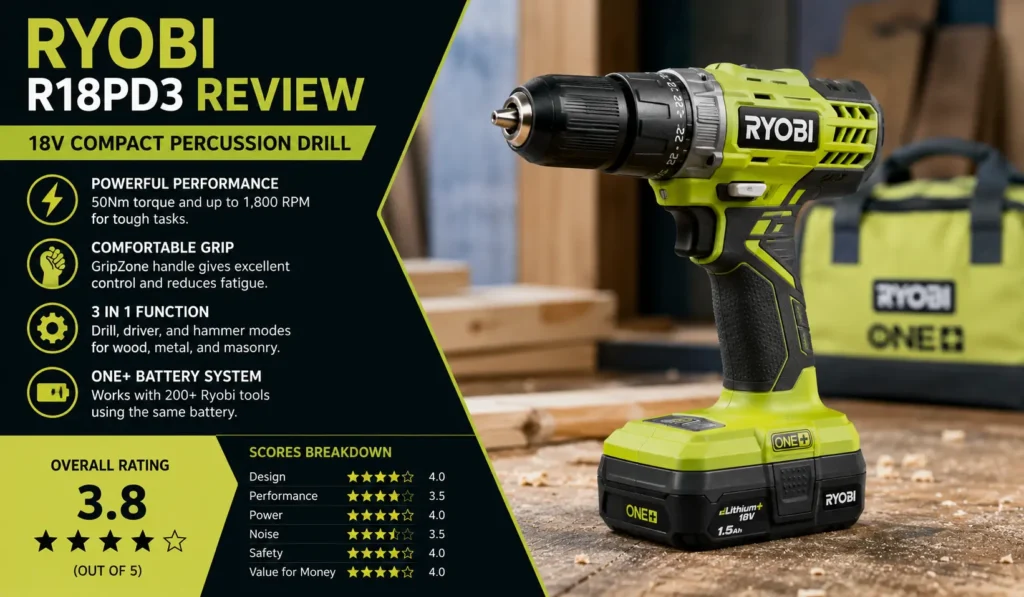
If you’re hunting for a solid cordless drill without breaking the bank, the Ryobi R18PD3 review is exactly what you need to read first. I’ve used this drill on real jobs — from timber framing to brick walls — and I can tell you it punches well above its price tag. It’s not perfect, but for a DIYer or weekend warrior, it gets the job done. Stick around, because I’m sharing everything I found so you don’t waste a single dollar.
What I Like
The Ryobi R18PD3 has some real standout qualities. Here’s what impressed me most after putting it through its paces.
- GripZone Handle Feels Amazing: The moment I picked this drill up, I felt the difference. Ryobi’s GripZone rubber grip has hundreds of tiny plus signs molded into it. My hand just locks in. Even after an hour of drilling, my wrist didn’t ache. That’s rare for a drill in this price range.
- Two Batteries Included: I was honestly surprised. Most kits give you one battery and call it a day. Ryobi throws in two 1.5 Ah batteries. This means I kept one on the charger while I used the other. Zero downtime. If you’re working on a weekend project and can’t afford to stop, this matters a lot.
- ONE+ Battery System is a Game-Changer: This is the big one. The same battery powers over 200 Ryobi tools. I already use a Ryobi circular saw and leaf blower. When I picked up this drill, I didn’t need a new charger or extra batteries. For US homeowners building out a cordless tool collection, this platform saves serious money over time.
- 24 Clutch Settings: I drove everything from small cabinet screws to 70 mm structural screws. The clutch clicked in smoothly each time. I never stripped a screw head. That level of control is something I didn’t expect at this price point.
- Tiny Fast Charger: The IntelliPort charger fits in my palm. I tossed it in my tool bag and forgot it was there. It charges a battery in about three hours and flashes to tell you when it’s done. Simple. Clean. Useful.
- Built-in Bit Holder: There’s a small magnetic bit holder on the base of the grip. It comes loaded with a double-ended PZ2 and flathead bit. I can’t count how many times I’ve needed a bit and couldn’t find one. This tiny detail saves real frustration on the job.
What Could Be Better
No drill is perfect. Here’s where the Ryobi R18PD3 left me wanting more.
- Brushed Motor Limits Efficiency: The R18PD3 uses a brushed motor. That’s fine for DIY work, but it’s less efficient than brushless motors found on the DeWalt DCD796 or Makita DHP484. You’ll notice slightly shorter battery life under heavy use. If you’re drilling all day, this matters.
- Speed Feels Inconsistent: When I drilled 30 holes into 38 mm timber, the speed felt different hole to hole. I had the trigger pulled all the way back each time. It wasn’t a huge deal, but it slowed me down and made the job feel less smooth than I’d like.
- No Charge Indicator on the Drill: There’s no battery gauge on the drill body itself. The battery just dies. No warning. No light. Nothing. I’d walk away, come back, and find it dead. For a tool this capable, that feels like a missed feature.
- Feels Heavy and Bulky: At 1.3 kg, it’s not the lightest drill. The large ONE+ battery pack makes the bottom end feel clunky. I noticed this most when drilling overhead. My arm tired faster than with sleeker competitors. If you’re doing tight-space work, the 215 mm body length is also a bit much.
- LED Only Works When Trigger is Pressed: The work light turns off the moment you release the trigger. I love a torch mode — where you can hold the trigger lightly and just get light without spinning the bit. The Makita DHP484 does this. The Ryobi doesn’t. A small thing, but I missed it.
My Personal Experience with the Ryobi R18PD3
I’ll be honest — I didn’t expect to like this drill as much as I do. I picked it up as a backup tool, not a primary one. Within a week, it had replaced my old drill entirely.
Here’s a breakdown of what I actually did with it:
- Timber work: I drilled over 30 holes into 38 mm CLS timber in one session. The drill handled it. It wasn’t lightning-fast, but it got through clean every time.
- Brick drilling: I punched a 5 mm hole through a standard house brick in about 20 seconds in hammer mode. That’s solid. No complaints there.
- Steel plate: Drilling through a 3 mm steel plate took about 1 minute 15 seconds. Not record-breaking, but totally usable for occasional metalwork.
- Screw driving: I drove ten 70 mm screws into CLS timber without issue. The clutch kicked in nicely. The weight of the drill actually helped me push screws in cleanly.
- Long screws: I tried a 150 mm wood screw. The clutch slipped before it fully bottomed out. A bit frustrating, but not a dealbreaker for most tasks.
What surprised me most was how comfortable the drill felt across all these tasks. The GripZone handle really does reduce fatigue. And having two batteries meant I never stopped working. I’d drain one, swap it out, and keep going while the other recharged.
One thing I’ll add for those in the US: Ryobi tools are widely available at Home Depot across the country. That makes getting replacement batteries, bits, and accessories really easy. No hunting around. No waiting for shipping. That accessibility matters when you’re mid-project.
Overall, I’d call this my best value cordless drill purchase in years. It’s not a pro tool, but it doesn’t pretend to be. It just works.
Comparing With Other Brands
I’ve also used the DeWalt DCD796 and the Makita DHP484 extensively. Both are strong brushless options aimed at more professional use. Compared to the Ryobi R18PD3, they offer more power and efficiency — but they also cost significantly more and don’t always come with two batteries included. Here’s how they stack up.
Ryobi R18PD3 vs DeWalt DCD796: Quick Comparison
| Feature | Ryobi R18PD3 | DeWalt DCD796 |
| Motor Type | Brushed | Brushless |
| Max Torque | 50 Nm | 70 Nm |
| Max Speed | 1,800 RPM | 2,000 RPM |
| Weight | 1.3 kg | 1.3 kg |
| Battery Included | 2 x 1.5 Ah | Varies by kit |
| Clutch Settings | 24 | 15 |
| Chuck Size | 13 mm | 13 mm |
| Noise Level | 96.6 dB | ~95 dB |
| Battery Platform | Ryobi ONE+ (200+ tools) | DeWalt XR (100+ tools) |
| Best For | DIY / Home Use | Professional / Heavy Use |
| Price Range | Budget–Mid | Mid–Premium |
Ryobi R18PD3 vs Makita DHP484: Quick Comparison
| Feature | Ryobi R18PD3 | Makita DHP484 |
| Motor Type | Brushed | Brushless |
| Max Torque | 50 Nm | 54 Nm |
| Max Speed | 1,800 RPM | 2,100 RPM |
| Weight | 1.3 kg | 1.5 kg |
| Battery Included | 2 x 1.5 Ah | Varies by kit |
| Clutch Settings | 24 | 21 |
| LED Torch Mode | No | Yes |
| Chuck Size | 13 mm | 13 mm |
| Battery Platform | Ryobi ONE+ | Makita LXT |
| Best For | DIY / Home Use | Professional / Trade Use |
| Price Range | Budget–Mid | Mid–Premium |
Ryobi R18PD3 vs Terratek 18V: Quick Comparison
| Feature | Ryobi R18PD3 | Terratek 18V |
| Motor Type | Brushed | Brushed |
| Max Torque | 50 Nm | ~30 Nm |
| Max Speed | 1,800 RPM | 1,500 RPM |
| Weight | 1.3 kg | ~1.1 kg |
| Body Length | 215 mm | Shorter / Compact |
| Battery Platform | ONE+ (200+ tools) | Standalone |
| Clutch Settings | 24 | 18 |
| Best For | DIY / Ecosystem Use | Tight Spaces / Light Use |
| Price Range | Budget–Mid | Budget |
Recommendation
Here’s my honest take on who should buy the Ryobi R18PD3 — and who should think twice.
Buy it if you:
- Are a DIY homeowner who wants a reliable everyday drill
- Already own Ryobi ONE+ tools and want to expand your battery ecosystem
- Want two batteries included without paying a premium
- Need a comfortable, well-built drill for small to medium jobs
- Are in the US and want easy access to accessories at Home Depot
Do more research if you:
- Are a professional tradesperson who drills all day — the brushed motor won’t keep up
- Need to work in very tight spaces — the 215 mm body length is limiting
- Want a torch mode on your LED — this drill doesn’t have it
- Need more than 50 Nm of torque regularly — look at DeWalt or Makita instead
I picked this up as my go-to home drill, and it hasn’t let me down. It’s not a professional powerhouse. But for drilling, screwdriving, and the occasional brick or steel task? It’s honest, capable, and good value. If you’re starting out with cordless tools or building up a home workshop, the Ryobi R18PD3 is one of the smartest first purchases you can make.
FAQs for Ryobi R18PD3 Review
Is the Ryobi R18PD3 good for beginners?
Yes. The Ryobi R18PD3 is great for beginners. It comes with two batteries, a charger, and 24 clutch settings. It’s easy to use and forgiving. If you’re just starting out with DIY tasks, this drill has everything you need.
What is the Ryobi R18PD3 max torque?
The Ryobi R18PD3 delivers 50 Nm of torque. That’s enough for most home DIY tasks like drilling into wood, brick, and light steel. For heavy trade work, you may want more torque.
Does the Ryobi R18PD3 come with batteries?
Yes. The Ryobi R18PD3 kit includes two 1.5 Ah 18V lithium-ion batteries and one IntelliPort fast charger. This gives you great runtime and less downtime between uses.
Is the Ryobi R18PD3 compatible with other Ryobi tools?
Yes. The R18PD3 uses Ryobi’s ONE+ 18V battery system. The same battery works across 200+ Ryobi tools, including sanders, saws, blowers, and more. It’s one of the most versatile battery platforms available.
How loud is the Ryobi R18PD3?
Ryobi rates the R18PD3 at 96.6 dB sound power level. That’s similar to a loud nightclub. Always wear ear protection when using it in hammer mode. In driver mode, the noise is much lower.
How long does the Ryobi R18PD3 battery last?
On a single 1.5 Ah charge, Ryobi claims the battery can drive up to 160 screws (13 x 50 mm) into wood. Real-world results vary. For extended sessions, having the second battery keeps you working without stopping.
Does the Ryobi R18PD3 have a brushless motor?
No. The R18PD3 has a brushed motor. It works well for DIY tasks but is less efficient than brushless models. If you need brushless performance from Ryobi, look at the R18PD7 or similar updated models.